NT Puncher: Punch Clock for Mac & iPhone
Clock in, clock out and take breaks, as a native app on Mac and iPhone with a glass UI, animated SF Symbols and an actor architecture. And under the hood, a complete stack switch that nobody was supposed to notice.
September 2025
Project
NT Puncher: Punch Clock for Mac & iPhone
Technologies Used
Challenge
NT Puncher (spelled out as Novatime Puncher inside the app) is a spare-time project in two acts. Act one: a small Flutter desktop app for clocking in and out against the NovaTime time tracking system, with punch in/out, break tracking and auto-logout. Written long before my AI-native workflow, entirely by hand. It ran in production for years, but it never felt truly at home on the Mac: generic UI, heavyweight runtime, and the old singleton-and-streams code had nothing in common with Swift's modern concurrency world.
Act two, again in my spare time: rebuild the app natively in SwiftUI, this time AI-native. The catch: it is in daily production use, and when a migration breaks something familiar, it creates questions and distrust. The bar was therefore split in two: behavior, data and color logic had to stay exactly the same, while the look and feel were finally allowed to become properly macOS.
Two parity requirements were hard constraints, the rest was product decision:
- Existing credentials stored in encrypted form must remain transparently readable, so the Flutter app's encryption format is locked in, bit for bit
- The color logic of the time displays must stay identical, because a day showing a different color is a bug in the users' eyes
- Everything else, from copy to spacing to auto-logout behavior, stays 1:1 on principle, so the switch is invisible
Solution
The core of the implementation is less a UI rewrite than a methodology: the old app becomes the untouchable reference, and every deviation needs a reason. Four building blocks carry that.
Blueprint instead of gut feeling
The complete Flutter app lives in the repo as a read-only reference. It is never edited; it provides the target values: business rules, state transitions, copy, color calculations. A migration spec describes the target in detail, and comparisons against the blueprint replace discussions. The punch state machine (four states, four action codes, including edge cases like “punching out during a break”) was carried over one to one instead of being reinvented.
Bit-exact crypto compatibility
The Flutter app stores credentials AES-GCM-encrypted in its own format: nonce, ciphertext and auth tag as hex strings, separated by slashes. The Swift side implements exactly this format with CryptoKit: existing data is decrypted transparently, new data is written compatibly. It is the only place in the project where bit-level fidelity to a foreign format must be guaranteed, and therefore the place where a silent bug would be most expensive.
Actors instead of locks
The new app uses Swift's Approachable Concurrency consistently: UI code is MainActor-isolated by default, and everything concurrent (API controller, state service, logging, auto-logout scheduler, notifications) is its own actor. Not a single lock, no dispatch queues; data crosses isolation boundaries exclusively and visibly via await. The old approach of singletons and streams simply would not have made it past the compiler under Swift's Sendable checking, so the migration was also a forced architecture upgrade.
Native also means: feels native
This is where the rebuild was allowed to get visibly better: the macOS frosted-glass look (NSVisualEffectView for older systems, the native glassEffect API from macOS 26 on), animated SF Symbols for state changes and consistent design tokens behind shared view modifiers. What Flutter could only imitate, the platform now delivers itself. And for development without a reachable target system there is a complete mock layer as its own actor: identical protocol, realistic state transitions, without real punch requests ever reaching the production system.
Code Examples
Results
The native app has fully replaced the Flutter predecessor. Nothing familiar broke, and the new version immediately feels right:
- 1:1 replacement in daily production use: existing credentials, colors, copy and behavior identical
- Predecessor's encryption format rebuilt bit-exact in CryptoKit, no migration step needed for user data
- Consistent actor architecture without locks: thread safety is guaranteed by the compiler, not by convention
- Look natively evolved: glass look with version fallback, animated SF Symbols, genuine macOS feel
- Mock layer for fully offline development against realistic state transitions
- Universal app: brought to iPhone as a nice-to-have, every view designed for the platform instead of merely stretched
Later the iPhone version was added, more as a nice-to-have because the stack made it easy. Instead of just squeezing the Mac layout into a narrow window, every view is designed specifically for iPhone, so the app feels native there too and not like an afterthought.
The real takeaway is transferable: a migration has succeeded when nothing familiar breaks and the new version immediately feels right. The blueprint approach, meaning the old app as an untouchable reference, parity as the default and deviation only with a reason, turns a risky rewrite into a controlled, verifiable process. And the project marks a turning point for me: the Flutter predecessor was built entirely without AI, the rebuild AI-native. Same app, same developer, two eras of tooling.
In the video
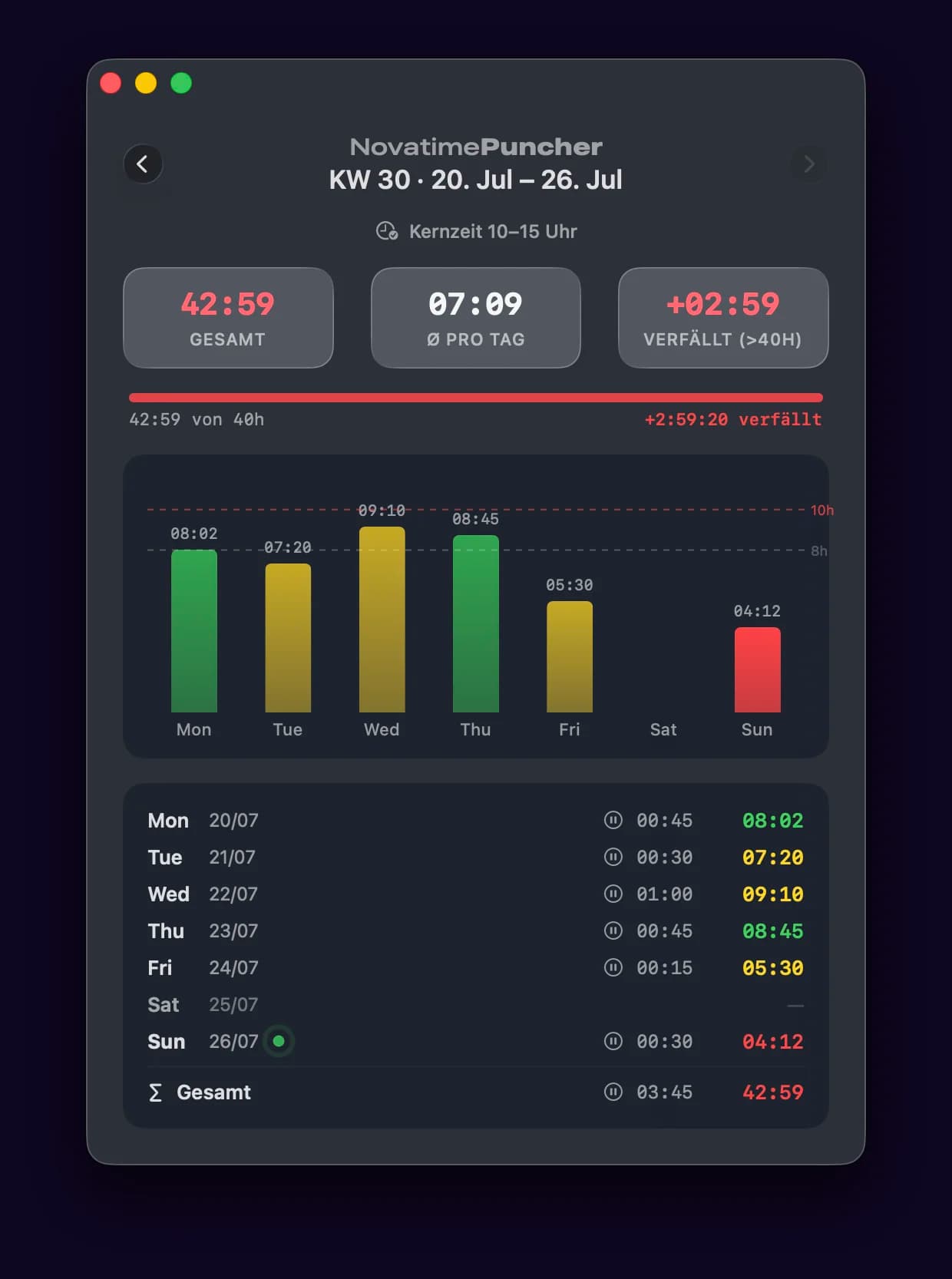
NT Puncher in action: clocking in and out, breaks and the weekly overview in the frosted-glass look with animated SF Symbols.
Insights
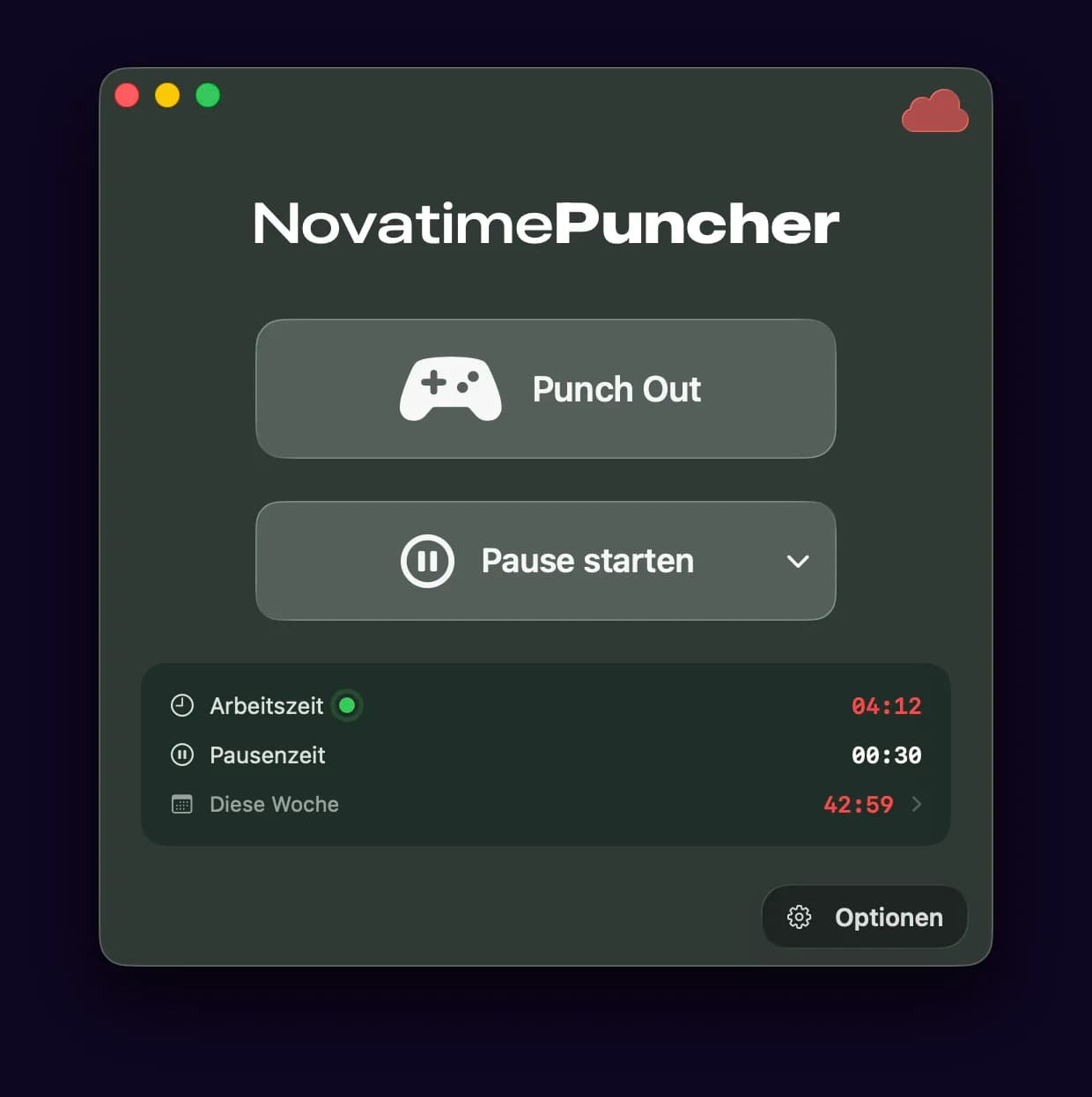
Punch out, break controls and daily overview in the frosted-glass look.
Comments
No comments yet. Go ahead and start.
Sign in real quick to join the conversation: